How to schedule a meeting across time zones without a back-and-forth email thread
By the Slotlu team · Published
Collect each person’s city and the hours they are willing to meet, rank every half-hour start against all of those hours at once, send two or three options in one message that already shows each person’s local time, and send the calendar invite only after the group picks one. Below is the whole run for a team in London, Berlin, Dubai and New York.
1. Everyone’s city and their own hours
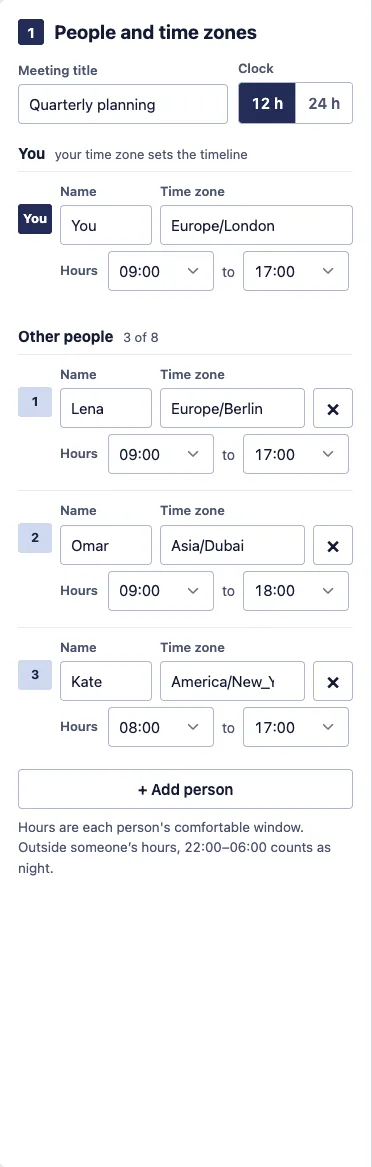
Ask for hours, not just a city. In this example Kate in New York starts at 8:00, Omar in Dubai works until 18:00, and London and Berlin work 9:00–17:00.
Open this example in the planner →
2. Rank the start times
The planner scores every half-hour start of the day against each person’s hours (how the ranking works). The score is the minutes the call starts before someone’s working day plus the minutes it runs past the end, added up over everyone. For a 45-minute call on Tuesday 9 February 2027:
| Rank | Local times | Inside their hours | Score |
|---|---|---|---|
| 1 | You 1:00 p.m., Lena 2:00 p.m., Omar 5:00 p.m., Kate 8:00 a.m. | 4 of 4 | 0 |
| 2 | You 1:30 p.m., Lena 2:30 p.m., Omar 5:30 p.m., Kate 8:30 a.m. | 3 of 4 | 15 |
| 3 | You 12:30 p.m., Lena 1:30 p.m., Omar 4:30 p.m., Kate 7:30 a.m. | 3 of 4 | 30 |
| 4 | You 2:00 p.m., Lena 3:00 p.m., Omar 6:00 p.m., Kate 9:00 a.m. | 3 of 4 | 45 |
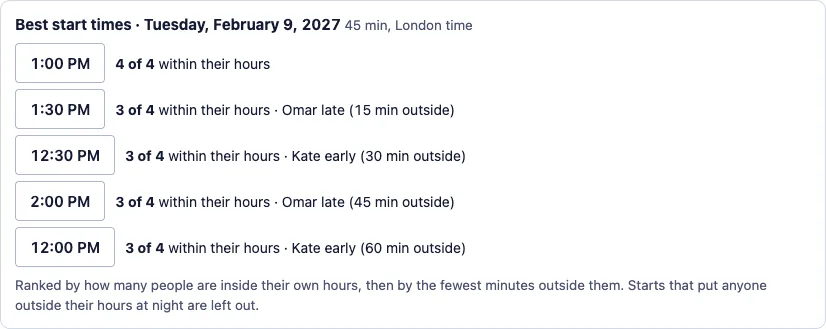
Here Kate’s 8:00 start and Omar’s 18:00 finish are what make 1:00 p.m. London time work for all four; with standard 9:00–17:00 hours for both there would be no such start. That is why the planner asks each person for their own hours. timeanddate’s Meeting Planner, by comparison, asks for a date and a list of cities; it does not ask each person for their own hours.
3. Offer two or three options
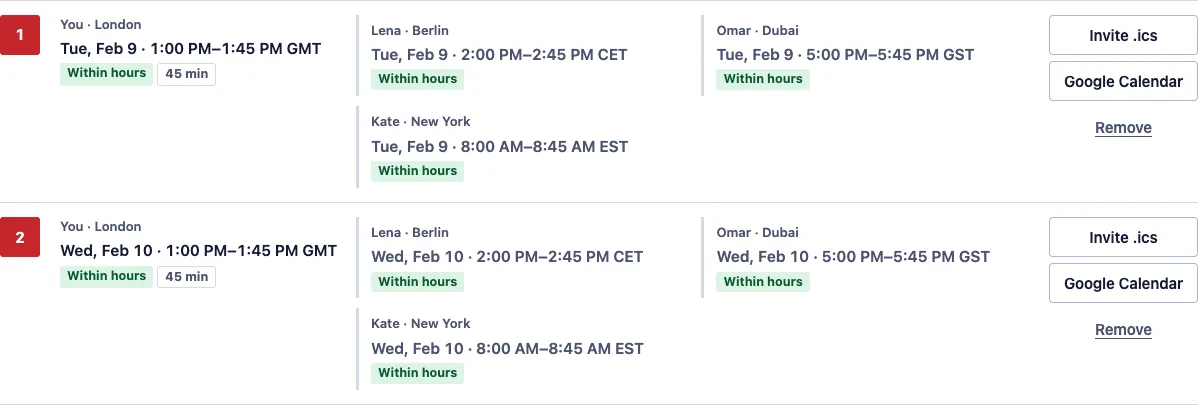
Add the best start, plus one on another day in case someone is busy. Each option is listed with everyone’s local time and whether it is inside their hours.
4. One message with every local time
Copy the message and paste it into email or chat. Each line is already in the reader’s own time zone, including the date when it differs:
Hi everyone,

Which of these times works for “Quarterly planning”? Each option is shown in everyone's local time.

Option 1: Tue, Feb 9 · 1:00 PM–1:45 PM GMT (London)
   Lena · Berlin: Tue, Feb 9 · 2:00 PM–2:45 PM CET
   Omar · Dubai: Tue, Feb 9 · 5:00 PM–5:45 PM GST
   Kate · New York: Tue, Feb 9 · 8:00 AM–8:45 AM EST

Option 2: Wed, Feb 10 · 1:00 PM–1:45 PM GMT (London)
   Lena · Berlin: Wed, Feb 10 · 2:00 PM–2:45 PM CET
   Omar · Dubai: Wed, Feb 10 · 5:00 PM–5:45 PM GST
   Kate · New York: Wed, Feb 10 · 8:00 AM–8:45 AM EST

Reply with the option number that suits you.
Everyone can answer with an option number, without converting anything back into your time zone.
5. Send the invite
When the group agrees, open that option in Google Calendar and add the guests there, or download its Invite .ics, which adds the event to a calendar, and attach it to your email. The .ics stores the time in UTC (RFC 5545), so each calendar shows it in its owner’s zone. This is the file for option 1:
BEGIN:VCALENDAR
VERSION:2.0
PRODID:-//Slotlu//Time Zone Meeting Planner//EN
CALSCALE:GREGORIAN
METHOD:PUBLISH
BEGIN:VEVENT
UID:example@slotlu.com
DTSTAMP:20270120T090000Z
DTSTART:20270209T130000Z
DTEND:20270209T134500Z
SUMMARY:Quarterly planning
STATUS:CONFIRMED
TRANSP:OPAQUE
END:VEVENT
END:VCALENDAR
Before the group has decided, All options as holds (.ics) blocks every option in your own calendar. Copy share link hands the whole plan to a co-organizer; anyone with the link can read the names and hours in it.
Sources
- IANA Time Zone Database: time zone data used for every offset
- RFC 5545, iCalendar: the .ics format
- timeanddate.com Meeting Planner: inputs of a grid-style planner (opened 10 November 2026)
Pages read on 10 November 2026. Offsets, rankings and messages on this page are computed with the planner’s own code from the IANA time zone data in the browser; open any example to repeat them.
Next steps
- Open the meeting planner with your own people and hours.
- US and India meeting times: when no time fits everyone.
- Research interview scheduler: when each participant should see only the slots offered to them.